How to log ESP32 boot
count and uptime
with LittleFS
The Idea
Every ESP32 you own has a history. How many times it has booted, how many projects it has run, how long it has been running in total. By default none of that is recorded anywhere. When you reflash a board it is as if its past never happened.
This guide shows you how to change that. A dedicated NVS namespace called board that you never clear. Every sketch you flash writes to it on boot. Over time it accumulates:
- A total boot count across all sketches ever flashed
- A list of every unique sketch ever run on the board, newest last
- Accumulated uptime across all sessions
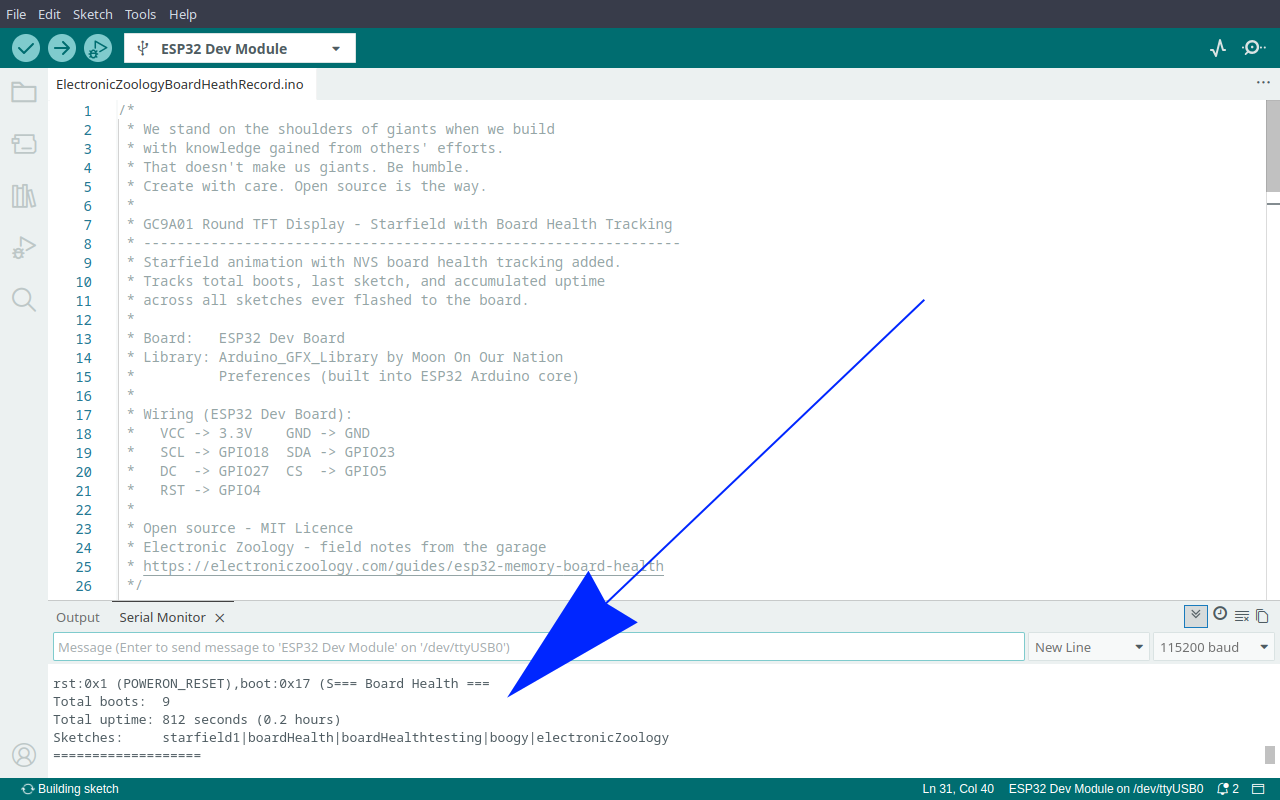
Pull up the serial monitor on any board and immediately know its history.
The Sketch
Add this to any project. Change the PROJECT_NAME string to match your sketch and the rest looks after itself.
/*
 * We stand on the shoulders of giants when we build
 * with knowledge gained from others' efforts.
 * That doesn't make us giants. Be humble.
 * Create with care. Open source is the way.
 *
 * ESP32 Board Health - Lifetime Tracking With NVS
 * ------------------------------------------------
 * Tracks total boot count, last sketch name, and
 * accumulated uptime across every sketch ever flashed.
 * Survives reflashing. Uses the Preferences library.
 *
 * Board:   Any ESP32
 * Library: Preferences (built into ESP32 Arduino core)
 *
 * Open source - MIT Licence
 * Electronic Zoology - field notes from the garage
 * https://electroniczoology.com/guides/how-to-log-esp32-boot-count-littlefs
 */

#include <Preferences.h>

#define PROJECT_NAME "my-project-name"
// Uptime save interval - uncomment one:
// #define UPTIME_SAVE_INTERVAL_MS (1UL * 60UL * 1000UL)   // 1 minute
// #define UPTIME_SAVE_INTERVAL_MS (30UL * 60UL * 1000UL)  // 30 minutes
#define UPTIME_SAVE_INTERVAL_MS   (60UL * 60UL * 1000UL)  // 1 hour

Preferences boardHealth;
uint32_t uptimeAtBoot = 0;

void logBoardHealth() {
    boardHealth.begin("board", false);

    uint32_t totalBoots = boardHealth.getUInt("totalBoots", 0) + 1;
    boardHealth.putUInt("totalBoots", totalBoots);

    // Unique list of every sketch ever flashed, newest last.
    // Format: "|sketch1|sketch2|sketch3|"
    String history = boardHealth.getString("sketchList", "|");
    String token = "|" PROJECT_NAME "|";
    if (history.indexOf(token) < 0) {
        history += String(PROJECT_NAME) + "|";
        boardHealth.putString("sketchList", history);
    }

    uptimeAtBoot = boardHealth.getUInt("totalUptime", 0);

    Serial.println("=== Board Health ===");
    Serial.printf("Total boots:  %lu\n", (unsigned long)totalBoots);
    Serial.printf("Total uptime: %lu seconds (%.1f hours)\n",
                  (unsigned long)uptimeAtBoot, uptimeAtBoot / 3600.0);
    Serial.print  ("Sketches:     ");
    Serial.println(history.substring(1, history.length() - 1));
    Serial.println("===================");

    boardHealth.end();
}

void saveUptime() {
    boardHealth.begin("board", false);
    boardHealth.putUInt("totalUptime", uptimeAtBoot + millis() / 1000);
    boardHealth.end();
}

void setup() {
    Serial.begin(115200);
    delay(1000);
    logBoardHealth();
}

void loop() {
    static uint32_t t0 = 0;
    if (millis() - t0 > UPTIME_SAVE_INTERVAL_MS) {
        t0 = millis();
        saveUptime();
    }
}
Adding to Your Sketch
The health tracker is four additions to any existing sketch. Here is the starfield animation sketch before and after adding it.
Before
/*
 * We stand on the shoulders of giants when we build
 * with knowledge gained from others' efforts.
 * That doesn't make us giants. Be humble.
 * Create with care. Open source is the way.
 *
 * GC9A01 Round TFT Display - Starfield
 * -------------------------------------
 * Renders a 150-star warp speed starfield on a
 * GC9A01 240x240 round IPS TFT display via SPI.
 *
 * Board:   ESP32 Dev Board
 * Library: Arduino_GFX_Library by Moon On Our Nation
 *
 * Wiring (ESP32 Dev Board):
 *   VCC -> 3.3V    GND -> GND
 *   SCL -> GPIO18  SDA -> GPIO23
 *   DC  -> GPIO27  CS  -> GPIO5
 *   RST -> GPIO4
 *
 * Open source - MIT Licence
 * Electronic Zoology - field notes from the garage
 * https://electroniczoology.com/guides/how-to-log-esp32-boot-count-littlefs
 */

#include <Arduino_GFX_Library.h>

// ESP32 Dev Board pins
#define TFT_DC  27
#define TFT_CS   5
#define TFT_RST  4
#define TFT_SCK 18
#define TFT_MOSI 23

Arduino_DataBus *bus = new Arduino_HWSPI(TFT_DC, TFT_CS, TFT_SCK, TFT_MOSI);
Arduino_GFX *gfx = new Arduino_GC9A01(bus, TFT_RST, 0, true);

#define CX        120
#define CY        120
#define NUM_STARS 150
#define SPEED     3.5f

struct Star { float x, y, z; int px, py; };
Star stars[NUM_STARS];

void resetStar(Star &s) {
  s.x = random(-120, 120);
  s.y = random(-120, 120);
  s.z = random(60, 240);
  s.px = -1; s.py = -1;
}

uint16_t grey(uint8_t v) {
  return ((v >> 3) << 11) | ((v >> 2) << 5) | (v >> 3);
}

void drawTitle() {
  gfx->setTextColor(0xFFFF);
  gfx->setTextSize(2);
  gfx->setCursor(60, 100); gfx->print("Electronic");
  gfx->setCursor(54, 122); gfx->print("Zoology.com");
}

void setup() {
  pinMode(4, OUTPUT);
  digitalWrite(4, LOW);
  Serial.begin(115200);
  randomSeed(analogRead(0));
  gfx->begin();
  gfx->fillScreen(0x0000);
  for (int i = 0; i < NUM_STARS; i++) {
    resetStar(stars[i]);
    stars[i].z = random(1, 240);
  }
}

void loop() {
  for (int i = 0; i < NUM_STARS; i++) {
    Star &s = stars[i];
    if (s.px >= 0) gfx->fillCircle(s.px, s.py, s.z > 120 ? 1 : 2, 0x0000);
    s.z -= SPEED;
    if (s.z <= 1) { resetStar(s); continue; }
    int sx = CX + (int)(s.x * 120.0f / s.z);
    int sy = CY + (int)(s.y * 120.0f / s.z);
    if (sx < 0 || sx >= 240 || sy < 0 || sy >= 240) { resetStar(s); continue; }
    uint8_t brightness = (uint8_t)((1.0f - s.z / 240.0f) * 220 + 35);
    int radius = s.z < 80 ? 2 : 1;
    gfx->fillCircle(sx, sy, radius, grey(brightness));
    s.px = sx; s.py = sy;
  }
  drawTitle();
}After - board health tracking added
/*
 * We stand on the shoulders of giants when we build
 * with knowledge gained from others' efforts.
 * That doesn't make us giants. Be humble.
 * Create with care. Open source is the way.
 *
 * GC9A01 Round TFT Display - Starfield with Board Health Tracking
 * ----------------------------------------------------------------
 * Starfield animation with NVS board health tracking added.
 * Tracks total boots, accumulated uptime, and a running list
 * of every sketch ever flashed to the board.
 *
 * Board:   ESP32 Dev Board
 * Library: Arduino_GFX_Library by Moon On Our Nation
 *          Preferences (built into ESP32 Arduino core)
 *
 * Wiring (ESP32 Dev Board):
 *   VCC -> 3.3V    GND -> GND
 *   SCL -> GPIO18  SDA -> GPIO23
 *   DC  -> GPIO27  CS  -> GPIO5
 *   RST -> GPIO4
 *
 * Open source - MIT Licence
 * Electronic Zoology - field notes from the garage
 * https://electroniczoology.com/guides/how-to-log-esp32-boot-count-littlefs
 */

#include <Arduino_GFX_Library.h>
#include <Preferences.h>

#define PROJECT_NAME "starfield"
// Uptime save interval - uncomment one:
// #define UPTIME_SAVE_INTERVAL_MS (1UL * 60UL * 1000UL)   // 1 minute
// #define UPTIME_SAVE_INTERVAL_MS (30UL * 60UL * 1000UL)  // 30 minutes
#define UPTIME_SAVE_INTERVAL_MS   (60UL * 60UL * 1000UL)  // 1 hour

// ESP32 Dev Board pins
#define TFT_DC  27
#define TFT_CS   5
#define TFT_RST  4
#define TFT_SCK 18
#define TFT_MOSI 23

Arduino_DataBus *bus = new Arduino_HWSPI(TFT_DC, TFT_CS, TFT_SCK, TFT_MOSI);
Arduino_GFX *gfx = new Arduino_GC9A01(bus, TFT_RST, 0, true);

#define CX        120
#define CY        120
#define NUM_STARS 150
#define SPEED     3.5f

struct Star { float x, y, z; int px, py; };
Star stars[NUM_STARS];
Preferences boardHealth;
uint32_t uptimeAtBoot = 0;

void resetStar(Star &s) {
  s.x = random(-120, 120);
  s.y = random(-120, 120);
  s.z = random(60, 240);
  s.px = -1; s.py = -1;
}

uint16_t grey(uint8_t v) {
  return ((v >> 3) << 11) | ((v >> 2) << 5) | (v >> 3);
}

void drawTitle() {
  gfx->setTextColor(0xFFFF);
  gfx->setTextSize(2);
  gfx->setCursor(60, 100); gfx->print("Electronic");
  gfx->setCursor(54, 122); gfx->print("Zoology.com");
}

void logBoardHealth() {
  boardHealth.begin("board", false);

  uint32_t totalBoots = boardHealth.getUInt("totalBoots", 0) + 1;
  boardHealth.putUInt("totalBoots", totalBoots);

  // Unique list of every sketch ever flashed, newest last.
  // Format: "|sketch1|sketch2|sketch3|"
  String history = boardHealth.getString("sketchList", "|");
  String token = "|" PROJECT_NAME "|";
  if (history.indexOf(token) < 0) {
    history += String(PROJECT_NAME) + "|";
    boardHealth.putString("sketchList", history);
  }

  uptimeAtBoot = boardHealth.getUInt("totalUptime", 0);

  Serial.println("=== Board Health ===");
  Serial.printf("Total boots:  %lu\n", (unsigned long)totalBoots);
  Serial.printf("Total uptime: %lu seconds (%.1f hours)\n",
                (unsigned long)uptimeAtBoot, uptimeAtBoot / 3600.0);
  Serial.print  ("Sketches:     ");
  Serial.println(history.substring(1, history.length() - 1));
  Serial.println("===================");

  boardHealth.end();
}

void saveUptime() {
  boardHealth.begin("board", false);
  boardHealth.putUInt("totalUptime", uptimeAtBoot + millis() / 1000);
  boardHealth.end();
}

void setup() {
  Serial.begin(115200);
  delay(1000);
  logBoardHealth();
  randomSeed(analogRead(0));
  gfx->begin();
  gfx->fillScreen(0x0000);
  for (int i = 0; i < NUM_STARS; i++) {
    resetStar(stars[i]);
    stars[i].z = random(1, 240);
  }
}

void loop() {
  for (int i = 0; i < NUM_STARS; i++) {
    Star &s = stars[i];
    if (s.px >= 0) gfx->fillCircle(s.px, s.py, s.z > 120 ? 1 : 2, 0x0000);
    s.z -= SPEED;
    if (s.z <= 1) { resetStar(s); continue; }
    int sx = CX + (int)(s.x * 120.0f / s.z);
    int sy = CY + (int)(s.y * 120.0f / s.z);
    if (sx < 0 || sx >= 240 || sy < 0 || sy >= 240) { resetStar(s); continue; }
    uint8_t brightness = (uint8_t)((1.0f - s.z / 240.0f) * 220 + 35);
    int radius = s.z < 80 ? 2 : 1;
    gfx->fillCircle(sx, sy, radius, grey(brightness));
    s.px = sx; s.py = sy;
  }
  drawTitle();

  static uint32_t t0 = 0;
  if (millis() - t0 > UPTIME_SAVE_INTERVAL_MS) {
    t0 = millis();
    saveUptime();
  }
}Change PROJECT_NAME for each new sketch and the rest is identical every time.
What You Get
Every board you own builds its own record. A board you have had for two years and run twenty projects on will tell you that. A board you just pulled from a bag will show zero boots and no project history.
Notes
The one thing that resets it
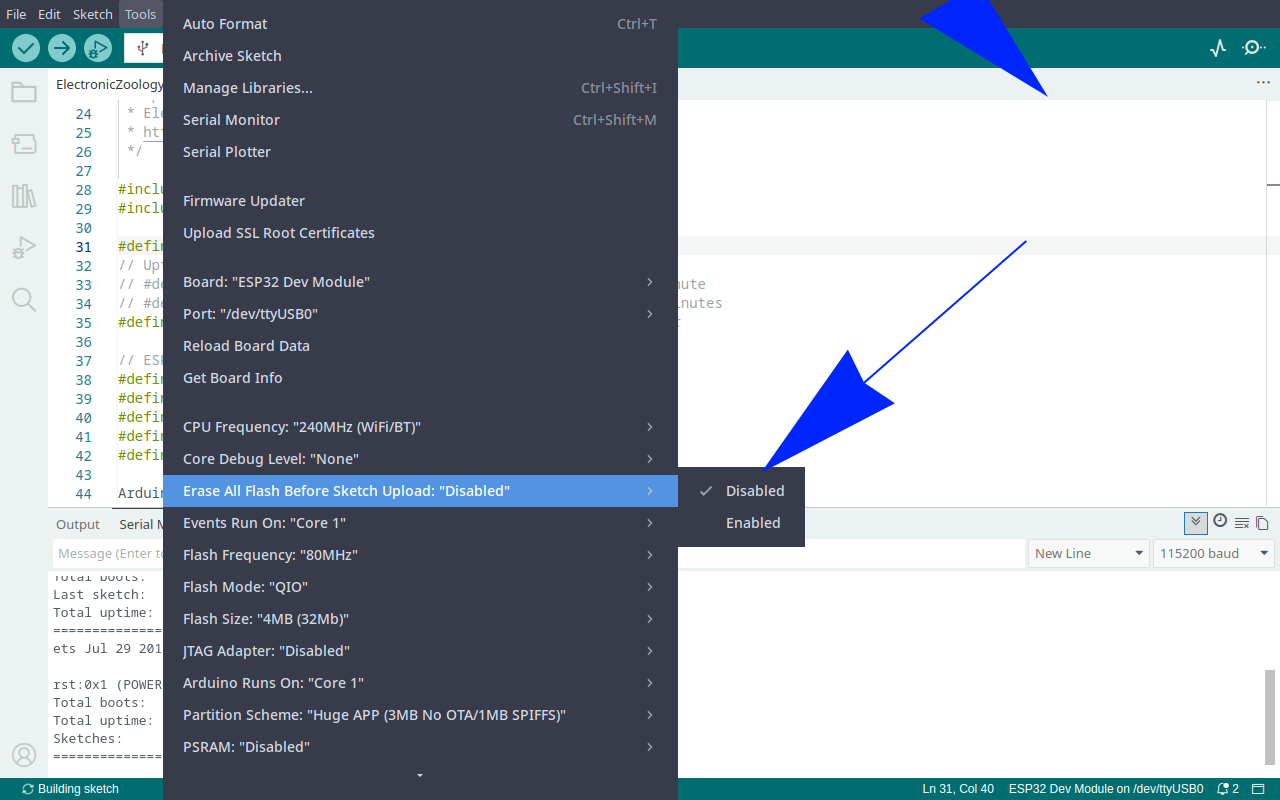
NVS persists across reflashing but not across a full flash erase. If you use Tools in the Arduino IDE to erase all flash, or use esptool to wipe the chip, the board health partition goes with it. That is the only way to reset it to zero, which means it only happens when you choose it to.
Write cycles
NVS uses wear levelling to spread writes across the flash cells. Saving uptime every 60 minutes is not going to wear out your flash in any realistic timeframe. If you are concerned, increase the save interval.