How to use ESP-NOW to connect
two ESP32s without a router
What You Will Learn
ESP-NOW lets two ESP32 boards send data directly to each other with no router, no IP address, no WiFi credentials, and no internet connection. The radio on each board speaks directly to the other at the MAC layer. It is fast, it works indoors across a house without dropping packets, and it is much simpler to set up than you might expect.
This guide teaches the mechanism with the smallest possible example. One ESP32 broadcasts its own MAC address as a string every five seconds. The other receives it and prints it to serial. That is all. No sensors, no display, nothing extra. Once you have seen two boards exchange data and understood why each line of code is there, you can apply ESP-NOW to anything.
The MAC address as payload is deliberate. It is self-referential: the sender tells you who it is, and you can cross-check that value against what the "get your MAC" sketch reported before you flashed the sender. If the number matches, the whole pipeline works.
What is a MAC Address?
A MAC address is a unique identifier assigned to every network device at the factory. It is 6 bytes long, written as six pairs of hex digits separated by colons - something like AA:BB:CC:11:22:33. Unlike an IP address, it is not assigned by a network and does not change. It is baked into the hardware. ESP-NOW uses MAC addresses to route packets directly between boards - no router needed to hand out addresses because each device already has one.
MAC addresses are a rabbit hole. They will be getting their own dedicated guide series.
What ESP-NOW Actually Is
Your ESP32 has a WiFi radio. That radio is normally used to connect to an access point, get an IP address, and join a network. ESP-NOW uses the same physical radio but skips all of that. It sends raw frames at the WiFi MAC layer, directly from one device to another.
There is no router involved. There is no IP stack. There are no credentials. The two boards do not need to be on the same network because there is no network. They just need to be within radio range of each other, which indoors is typically 20 to 50 metres depending on walls and interference.
The tradeoff is that ESP-NOW has no guaranteed delivery on its own. This guide uses broadcast mode - the sender sets the destination address to FF:FF:FF:FF:FF:FF so any nearby ESP-NOW device picks it up. The payload it sends is its own MAC address as a string. Both MACs are in play at once: one is where the packet is going, the other is what is inside it. Broadcast is the right choice for a first guide because it removes the need to register a specific peer before sending.
Packets are small. ESP-NOW's maximum payload is 250 bytes per packet. For sensor data, strings, and small structs, this is plenty.
Hardware
- Two ESP32 boards - any variant works (Dev Board, C3, S2, S3, etc.), 30-pin or 38-pin - see How to check a new ESP32
- Two USB cables and power sources
No wiring beyond USB power. No components, no breadboard.
The MAC Address Problem
Every ESP32 has a unique MAC address burned into it at the factory. ESP-NOW uses these addresses to route packets.
The MAC is not printed on the board. You have to ask the chip what it is. The sketch in the next section does exactly that. Flash it to a board, open serial monitor at 115200, and it prints the MAC. Copy it somewhere before you flash anything else - you will need it if you move to unicast later.
For this guide you are using broadcast, so the sender does not need the receiver's MAC.
Get Your MAC Sketch
Flash this to each board in turn. Open serial monitor at 115200. Note the address printed for each one.
/*
 * We stand on the shoulders of giants when we build
 * with knowledge gained from others' efforts.
 * That doesn't make us giants. Be humble.
 * Create with care. Open source is the way.
 *
 * ESP-NOW - Get MAC Address
 * --------------------------
 * Prints this board's WiFi MAC address to serial.
 * Flash to each board before starting. Note both addresses.
 *
 * Board:   ESP32 Dev Board (38-pin)
 *
 * Open source - MIT Licence
 * Electronic Zoology - field notes from the garage
 * https://electroniczoology.com/guides/how-to-use-esp-now-two-esp32s
 */

#include <WiFi.h>

void setup() {
  Serial.begin(115200);
  delay(500);

  WiFi.mode(WIFI_STA);

  Serial.print("MAC address: ");
  Serial.println(WiFi.macAddress());
}

void loop() {}The Sender Sketch
The sender initialises ESP-NOW, registers the broadcast address as a peer, then every five seconds it packages its own MAC address into a struct and broadcasts it.
A few things worth understanding before you read the code:
- The struct. Both sender and receiver use the same struct to define what a packet looks like. The sender fills it. The receiver reads it. If the structs differ between sketches, the data unpacks as garbage. Keep them identical.
- The send callback.
OnDataSentis called after each send attempt. In broadcast mode it always reports success because there is no recipient to confirm delivery. Do not do real work inside this callback. WiFi.mode(WIFI_STA)beforeesp_now_init(). ESP-NOW requires the WiFi radio to be initialised in station mode first. Skip this andesp_now_init()returns an error.
/*
 * We stand on the shoulders of giants when we build
 * with knowledge gained from others' efforts.
 * That doesn't make us giants. Be humble.
 * Create with care. Open source is the way.
 *
 * ESP-NOW Basics - Sender
 * ------------------------
 * Broadcasts this board's MAC address as a string once every five seconds.
 * No receiver MAC needed - uses broadcast address FF:FF:FF:FF:FF:FF.
 *
 * Board:   ESP32 Dev Board (38-pin)
 *
 * Open source - MIT Licence
 * Electronic Zoology - field notes from the garage
 * https://electroniczoology.com/guides/how-to-use-esp-now-two-esp32s
 */

#include <WiFi.h>
#include <esp_now.h>

// Broadcast to all ESP-NOW devices in range
uint8_t broadcastAddress[] = { 0xFF, 0xFF, 0xFF, 0xFF, 0xFF, 0xFF };

// Packet structure - must match receiver exactly
typedef struct {
  char macString[18];   // "AA:BB:CC:DD:EE:FF" + null terminator
} PacketData;

PacketData outgoing;
esp_now_peer_info_t peerInfo;

void OnDataSent(const wifi_tx_info_t *tx_info, esp_now_send_status_t status) {
  Serial.print("Send status: ");
  Serial.println(status == ESP_NOW_SEND_SUCCESS ? "OK" : "FAIL");
}

void setup() {
  Serial.begin(115200);
  delay(500);

  WiFi.mode(WIFI_STA);
  delay(100);

  String mac = WiFi.macAddress();
  mac.toCharArray(outgoing.macString, sizeof(outgoing.macString));

  Serial.print("Sender MAC: ");
  Serial.println(outgoing.macString);

  if (esp_now_init() != ESP_OK) {
    Serial.println("ESP-NOW init failed");
    while (true) delay(1000);
  }

  esp_now_register_send_cb(OnDataSent);

  memcpy(peerInfo.peer_addr, broadcastAddress, 6);
  peerInfo.channel = 0;
  peerInfo.encrypt = false;

  if (esp_now_add_peer(&peerInfo) != ESP_OK) {
    Serial.println("Failed to add peer");
    while (true) delay(1000);
  }

  Serial.println("Sender ready");
}

void loop() {
  static uint32_t lastSend = 0;

  if (millis() - lastSend >= 5000) {
    lastSend = millis();

    esp_err_t result = esp_now_send(
      broadcastAddress,
      (uint8_t *)&outgoing,
      sizeof(outgoing)
    );

    if (result != ESP_OK) {
      Serial.println("Send error");
    }
  }
}The Receiver Sketch
The receiver initialises ESP-NOW, registers a receive callback, and waits. When a packet arrives the callback fires, unpacks the struct, and prints the MAC string to serial.
Two things to know about the receive callback:
- The
macparameter is the sender's hardware MAC from the radio frame - not from inside the packet. TheincomingDatapointer is the raw packet bytes. Cast it to your struct pointer and you have the data. - Do not do slow work inside the callback. Print to serial, set a flag, copy to a global variable. If you need to update a display or write to a file, set a flag in the callback and handle it in
loop().
/*
 * We stand on the shoulders of giants when we build
 * with knowledge gained from others' efforts.
 * That doesn't make us giants. Be humble.
 * Create with care. Open source is the way.
 *
 * ESP-NOW Basics - Receiver
 * --------------------------
 * Listens for broadcast packets and prints the sender's MAC
 * string to serial. No sender MAC needed to receive broadcasts.
 *
 * Board:   ESP32 Dev Board (38-pin)
 *
 * Open source - MIT Licence
 * Electronic Zoology - field notes from the garage
 * https://electroniczoology.com/guides/how-to-use-esp-now-two-esp32s
 */

#include <WiFi.h>
#include <esp_now.h>

// Packet structure - must match sender exactly
typedef struct {
  char macString[18];
} PacketData;

PacketData incoming;
volatile bool newPacket = false;

void OnDataRecv(const esp_now_recv_info_t *recv_info, const uint8_t *incomingData, int len) {
  memcpy(&incoming, incomingData, sizeof(incoming));
  newPacket = true;
}

void setup() {
  Serial.begin(115200);
  delay(500);

  WiFi.mode(WIFI_STA);

  Serial.print("Receiver MAC: ");
  Serial.println(WiFi.macAddress());

  if (esp_now_init() != ESP_OK) {
    Serial.println("ESP-NOW init failed");
    while (true) delay(1000);
  }

  esp_now_register_recv_cb(OnDataRecv);

  Serial.println("Receiver ready - waiting for packets");
}

void loop() {
  if (newPacket) {
    newPacket = false;
    Serial.print("Received MAC from sender: ");
    Serial.println(incoming.macString);
  }
}What You Will See
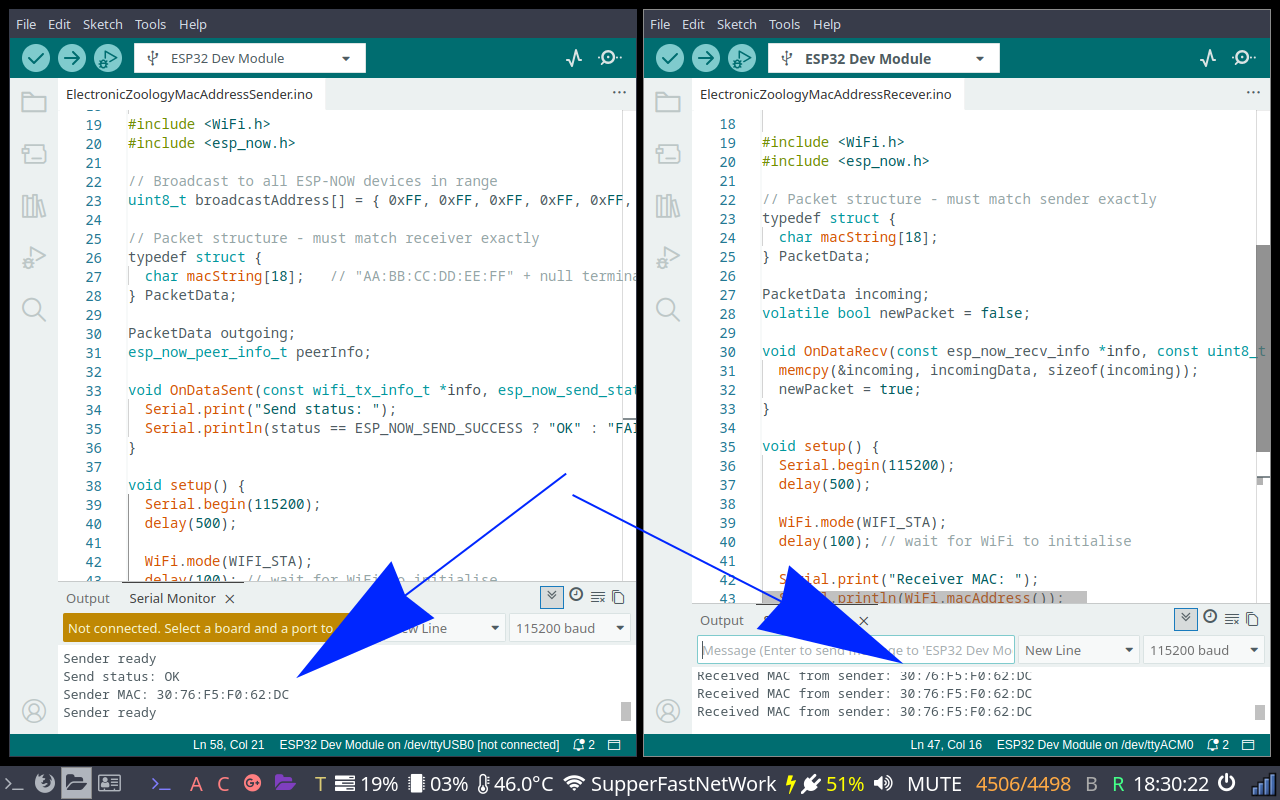
Flash the sender sketch to one board and the receiver sketch to the other. Power both. Open serial monitor on the receiver at 115200.
Every five seconds a line appears:
Received MAC from sender: AA:BB:CC:DD:EE:FFThe address printed is the sender's MAC. Cross-check it against what the "get your MAC" sketch reported for that board. They should match exactly. If they do, the full pipeline is working: the sender packaged its own identity, broadcast it over the air, and the receiver decoded it correctly.
Open serial monitor on the sender too. You will see a send status line every five seconds:
Send status: OKIn broadcast mode this is always OK.
Going Further
Add a timeout indicator
If the receiver gets no packet for more than ten seconds, print "signal lost" to serial. Store millis() each time a packet arrives and check the gap in loop(). This becomes useful immediately once you move the sender out of arm's reach.
Send to a specific board
Broadcast works for the bench. ESP-NOW also supports sending to a single target by MAC address - replace the broadcast address with the receiver's MAC and register it as a peer instead.
Send real data
Replace the MAC string in the struct with whatever you actually need: a float for temperature, two floats for voltage and current, a small array of readings. Both sides update the struct definition identically and the rest of the code stays the same.
Remote charger monitor
An INA219 current sensor on one ESP32 reads voltage and current from a TP4056 charging an 18650 cell and sends those readings over ESP-NOW to a second ESP32 connected to an SSD1306 OLED. The meter sits next to the charger. The display sits wherever you want it. See How to build an INA219 battery charger monitor with ESP32 and OLED for the single-board version this builds on.