How ESP32
RAM works
If your sketch is only doing one thing at a time RAM is most likely not going to be an issue. But if you are stacking libraries, running WiFi, or asking a lot to happen continuously, RAM can become a problem faster than you expect. This guide lets you see it in real time.
What Is RAM
If flash is the filing cabinet, RAM is the workbench.
When your ESP32 is running, it pulls things out of flash and works with them in RAM. Your variables live here. Your sensor readings, your counters, the current state of your program - all of it sits in RAM while your program is running.
RAM is fast. Much faster than flash. The ESP32 can read and write to it freely, as many times as it likes, with no wear concerns. The tradeoff is that it is volatile - the moment power is removed, everything in RAM is gone. It is also tiny in comparison, around 300KB on a standard ESP32.
Checking Your RAM
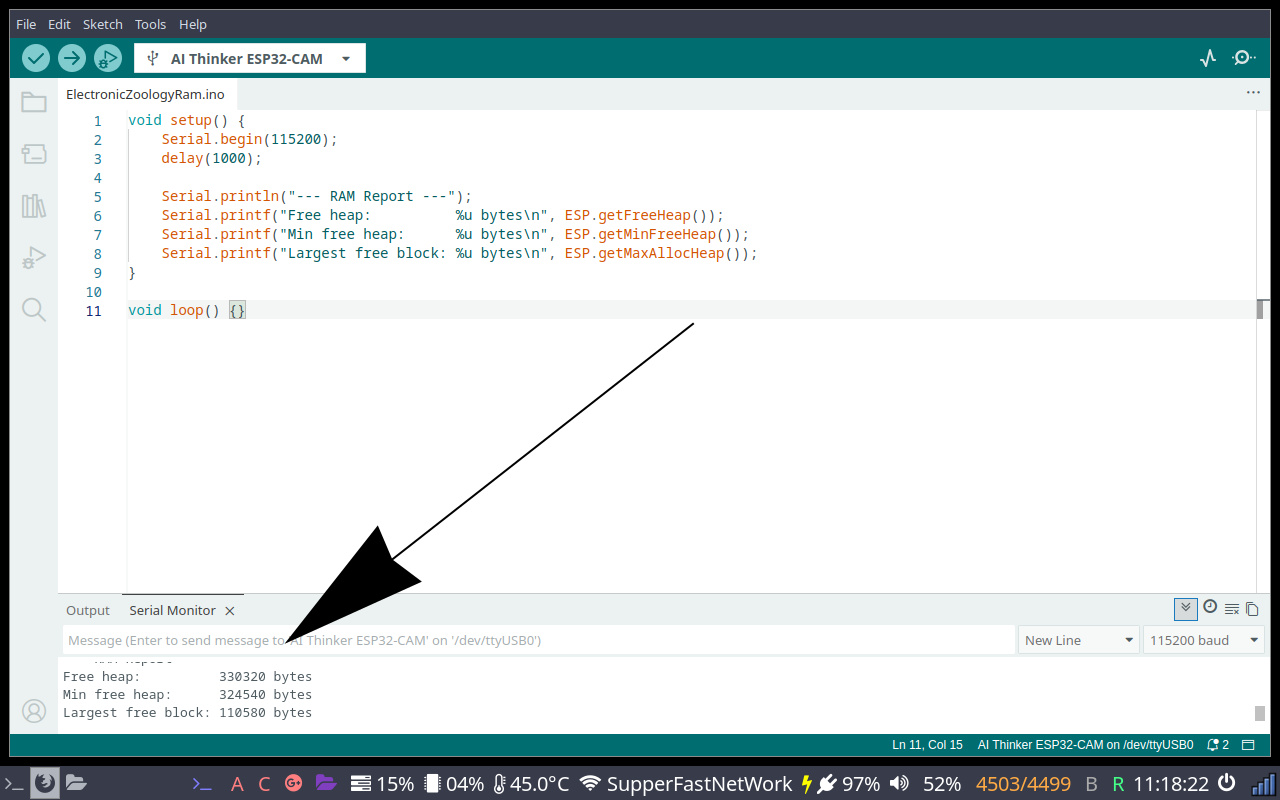
Upload this sketch and open the serial monitor at 115200 baud.
/*
 * We stand on the shoulders of giants when we build
 * with knowledge gained from others' efforts.
 * That doesn't make us giants. Be humble.
 * Create with care. Open source is the way.
 *
 * ESP32 RAM Report
 * ----------------
 * Report free heap, minimum heap, and largest free block.
 *
 * Board:   Any ESP32
 *
 * Open source - MIT Licence
 * Electronic Zoology - field notes from the garage
 * https://electroniczoology.com/guides/how-esp32-ram-works
 */

void setup() {
    Serial.begin(115200);
    delay(1000);

    Serial.println("--- RAM Report ---");
    Serial.printf("Free heap:          %u bytes\n", ESP.getFreeHeap());
    Serial.printf("Min free heap:      %u bytes\n", ESP.getMinFreeHeap());
    Serial.printf("Largest free block: %u bytes\n", ESP.getMaxAllocHeap());
}

void loop() {}What each line tells you
Free heap- how much RAM is available right now at startup, before your program does anything.Min free heap- the lowest RAM has ever dropped since boot. Run this after your program has been running for a while to catch memory leaks. If this keeps shrinking over time, something is not freeing memory.Largest free block- the biggest single contiguous chunk of RAM available. This is often the real constraint. Even if free heap looks healthy, fragmentation can mean no single allocation can claim a large block. If you are trying to allocate a large buffer and it fails, check this number first.
malloc is how code asks for a chunk of RAM at runtime - "give me 50,000 bytes right now." The ESP32 serves these requests from the heap, the same pool that getFreeHeap() reports on. The catch is that the heap can become fragmented over time - lots of small gaps between used blocks. You could have 200KB free in total but if it is broken into small pieces, a request for a single 50KB block will fail. That is why Largest free block matters more than total free heap when you are working with large buffers like bitmaps or audio data.
Adding RAM monitoring to your existing sketch
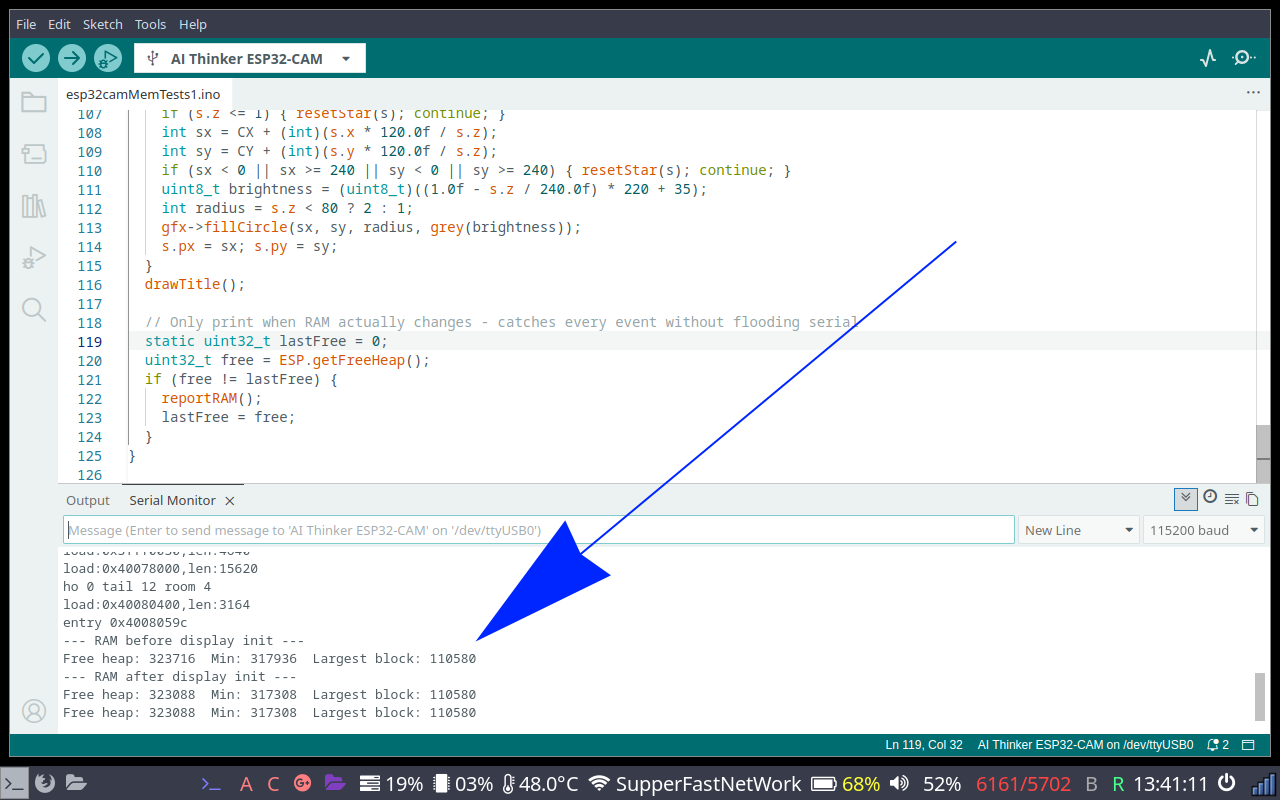
You do not need a dedicated sketch to check RAM. The more useful approach is adding the report calls directly into a sketch that is already doing something - so you can see what RAM looks like under real load. Here is the starfield sketch from the GC9A01 guide, before and after adding RAM monitoring.
Before
/*
 * We stand on the shoulders of giants when we build
 * with knowledge gained from others' efforts.
 * That doesn't make us giants. Be humble.
 * Create with care. Open source is the way.
 *
 * GC9A01 Round TFT Display - Starfield
 * -------------------------------------
 * Renders a 150-star warp speed starfield on a
 * GC9A01 240x240 round IPS TFT display via SPI.
 *
 * Board:   AI Thinker ESP32-CAM (Dev Board/WROVER pins commented out)
 * Library: Arduino_GFX_Library by Moon On Our Nation
 *
 * Wiring (ESP32-CAM):
 *   VCC -> 3.3V    GND -> GND
 *   SCL -> GPIO14  SDA -> GPIO13
 *   DC  -> GPIO2   CS  -> GPIO15
 *   RST -> GPIO16
 *
 * Open source - MIT Licence
 * Electronic Zoology - field notes from the garage
 * https://electroniczoology.com/guides/how-esp32-ram-works
 */

#include <Arduino_GFX_Library.h>

// ESP32-CAM pins - camera uses default SPI (18/23) so SCK/MOSI moved to 14/13
#define TFT_DC   2
#define TFT_CS  15
#define TFT_RST 16
#define TFT_SCK 14
#define TFT_MOSI 13

// ESP32 Dev Board / WROVER pins:
// #define TFT_DC  27
// #define TFT_CS   5
// #define TFT_RST  4
// #define TFT_SCK 18
// #define TFT_MOSI 23

// ESP32-CAM: SCK and MOSI passed explicitly - hardware SPI defaults (18/23) are camera pins
Arduino_DataBus *bus = new Arduino_HWSPI(TFT_DC, TFT_CS, TFT_SCK, TFT_MOSI);
Arduino_GFX *gfx = new Arduino_GC9A01(bus, TFT_RST, 0, true);

#define CX        120
#define CY        120
#define NUM_STARS 150
#define SPEED     3.5f

struct Star { float x, y, z; int px, py; };
Star stars[NUM_STARS];

void resetStar(Star &s) {
  s.x = random(-120, 120);
  s.y = random(-120, 120);
  s.z = random(60, 240);
  s.px = -1; s.py = -1;
}

uint16_t grey(uint8_t v) {
  return ((v >> 3) << 11) | ((v >> 2) << 5) | (v >> 3);
}

void drawTitle() {
  gfx->setTextColor(0xFFFF);
  gfx->setTextSize(2);
  gfx->setCursor(60, 100); gfx->print("Electronic");
  gfx->setCursor(54, 122); gfx->print("Zoology.com");
}

void setup() {
  pinMode(4, OUTPUT);       // ESP32-CAM: GPIO 4 is LED flash - pull low to prevent boot glitch
  digitalWrite(4, LOW);
  Serial.begin(115200);
  randomSeed(analogRead(0));
  gfx->begin();
  gfx->fillScreen(0x0000);
  for (int i = 0; i < NUM_STARS; i++) {
    resetStar(stars[i]);
    stars[i].z = random(1, 240);
  }
}

void loop() {
  for (int i = 0; i < NUM_STARS; i++) {
    Star &s = stars[i];
    if (s.px >= 0) gfx->fillCircle(s.px, s.py, s.z > 120 ? 1 : 2, 0x0000);
    s.z -= SPEED;
    if (s.z <= 1) { resetStar(s); continue; }
    int sx = CX + (int)(s.x * 120.0f / s.z);
    int sy = CY + (int)(s.y * 120.0f / s.z);
    if (sx < 0 || sx >= 240 || sy < 0 || sy >= 240) { resetStar(s); continue; }
    uint8_t brightness = (uint8_t)((1.0f - s.z / 240.0f) * 220 + 35);
    int radius = s.z < 80 ? 2 : 1;
    gfx->fillCircle(sx, sy, radius, grey(brightness));
    s.px = sx; s.py = sy;
  }
  drawTitle();
}After - RAM monitoring added (ESP32-CAM pins, Dev Board pins commented out)
/*
 * We stand on the shoulders of giants when we build
 * with knowledge gained from others' efforts.
 * That doesn't make us giants. Be humble.
 * Create with care. Open source is the way.
 *
 * GC9A01 Round TFT Display - Starfield with RAM Monitoring
 * ---------------------------------------------------------
 * Starfield sketch from the GC9A01 guide, adapted for the
 * ESP32-CAM to demonstrate live RAM monitoring. Shows RAM
 * before and after display init, then on every change at runtime.
 *
 * Board:   AI Thinker ESP32-CAM (Dev Board/WROVER pins commented out)
 * Library: Arduino_GFX_Library by Moon On Our Nation
 *
 * Wiring (ESP32-CAM):
 *   VCC -> 3.3V    GND -> GND
 *   SCL -> GPIO14  SDA -> GPIO13
 *   DC  -> GPIO2   CS  -> GPIO15
 *   RST -> GPIO16
 *
 * Open source - MIT Licence
 * Electronic Zoology - field notes from the garage
 * https://electroniczoology.com/guides/how-esp32-ram-works
 */

#include <Arduino_GFX_Library.h>

// ESP32-CAM pins - camera uses default SPI (18/23) so SCK/MOSI moved to 14/13
#define TFT_DC   2
#define TFT_CS  15
#define TFT_RST 16
#define TFT_SCK 14
#define TFT_MOSI 13

// ESP32 Dev Board pins:
// #define TFT_DC  27
// #define TFT_CS   5
// #define TFT_RST  4
// #define TFT_SCK 18
// #define TFT_MOSI 23

// ESP32-CAM: SCK and MOSI passed explicitly - hardware SPI defaults (18/23) are camera pins
Arduino_DataBus *bus = new Arduino_HWSPI(TFT_DC, TFT_CS, TFT_SCK, TFT_MOSI);
Arduino_GFX *gfx = new Arduino_GC9A01(bus, TFT_RST, 0, true);

#define CX        120
#define CY        120
#define NUM_STARS 150
#define SPEED     3.5f

struct Star { float x, y, z; int px, py; };
Star stars[NUM_STARS];

void resetStar(Star &s) {
  s.x = random(-120, 120);
  s.y = random(-120, 120);
  s.z = random(60, 240);
  s.px = -1; s.py = -1;
}

uint16_t grey(uint8_t v) {
  return ((v >> 3) << 11) | ((v >> 2) << 5) | (v >> 3);
}

void drawTitle() {
  gfx->setTextColor(0xFFFF);
  gfx->setTextSize(2);
  gfx->setCursor(60, 100); gfx->print("Electronic");
  gfx->setCursor(54, 122); gfx->print("Zoology.com");
}

// RAM report helper - call anywhere you want a snapshot
void reportRAM() {
  Serial.printf("Free heap: %u  Min: %u  Largest block: %u\n",
    ESP.getFreeHeap(),
    ESP.getMinFreeHeap(),
    ESP.getMaxAllocHeap());
}

void setup() {
  pinMode(4, OUTPUT);       // ESP32-CAM: GPIO 4 is LED flash - pull low to prevent boot glitch
  digitalWrite(4, LOW);
  Serial.begin(115200);
  delay(1000);

  Serial.println("--- RAM before display init ---");
  reportRAM();

  randomSeed(analogRead(0));
  gfx->begin();
  gfx->fillScreen(0x0000);
  for (int i = 0; i < NUM_STARS; i++) {
    resetStar(stars[i]);
    stars[i].z = random(1, 240);
  }

  Serial.println("--- RAM after display init ---");
  reportRAM();
}

void loop() {
  for (int i = 0; i < NUM_STARS; i++) {
    Star &s = stars[i];
    if (s.px >= 0) gfx->fillCircle(s.px, s.py, s.z > 120 ? 1 : 2, 0x0000);
    s.z -= SPEED;
    if (s.z <= 1) { resetStar(s); continue; }
    int sx = CX + (int)(s.x * 120.0f / s.z);
    int sy = CY + (int)(s.y * 120.0f / s.z);
    if (sx < 0 || sx >= 240 || sy < 0 || sy >= 240) { resetStar(s); continue; }
    uint8_t brightness = (uint8_t)((1.0f - s.z / 240.0f) * 220 + 35);
    int radius = s.z < 80 ? 2 : 1;
    gfx->fillCircle(sx, sy, radius, grey(brightness));
    s.px = sx; s.py = sy;
  }
  drawTitle();

  // Only print when RAM actually changes - catches every event without flooding serial
  static uint32_t lastFree = 0;
  uint32_t free = ESP.getFreeHeap();
  if (free != lastFree) {
    reportRAM();
    lastFree = free;
  }
}
This gives you three meaningful snapshots:
- Before init - your baseline. This is how much RAM the chip has free before your code does anything.
- After init - shows exactly what your libraries and setup code cost. The difference between before and after is what the display library consumed just to start up.
- On every RAM change in loop - prints only when free heap changes, so you catch every event without flooding the serial monitor. If you used a fixed timer you could miss a spike that happens between reports. If
Min free heapkeeps dropping over time, something is allocating memory and not releasing it.
const and the compiler handles it. That leaves your heap free for the things that actually need to change at runtime.
What a Real Project Costs
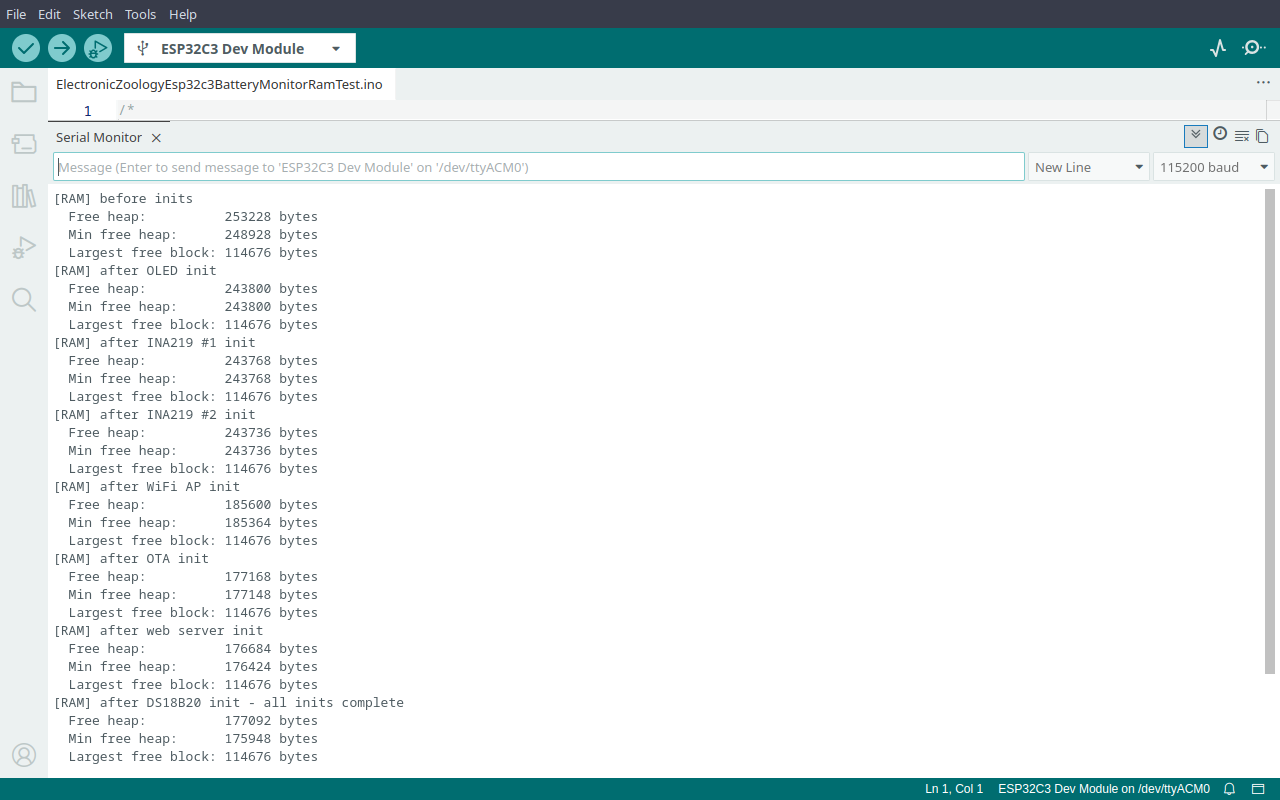
Here is what the dual channel battery monitor from Electronic Zoology reports on an ESP32-C3 Super Mini - WiFi AP, OTA, web server, SSD1306 OLED, two INA219 sensors, and a DS18B20 temperature sensor all initialising in sequence.
| Init step | Free heap | Cost |
|---|---|---|
| Before inits | 253,228 bytes | baseline |
| After OLED | 243,800 bytes | 9,428 bytes |
| After INA219 #1 | 243,768 bytes | 32 bytes |
| After INA219 #2 | 243,736 bytes | 32 bytes |
| After WiFi AP | 185,600 bytes | 58,136 bytes |
| After OTA | 177,168 bytes | 8,432 bytes |
| After web server | 176,684 bytes | 484 bytes |
| After DS18B20 | 177,092 bytes | +408 freed |
Total consumed by init: 76,136 bytes. Nearly 30% of available RAM gone before the main loop starts. WiFi alone takes 58KB in a single hit.
The heap breathes
Once running, free heap does not sit still. The WiFi stack makes small allocations and frees them continuously as it handles connections. Here is what that looks like in the serial monitor on a live system:
[RAM] heap changed: 177092 -> 176936 bytes (delta: -156)
[RAM] heap changed: 176936 -> 176928 bytes (delta: -8)
[RAM] heap changed: 176928 -> 176920 bytes (delta: -8)
[RAM] heap changed: 176920 -> 176912 bytes (delta: -8)
[RAM] heap changed: 176912 -> 176920 bytes (delta: +8)
[RAM] heap changed: 176920 -> 176888 bytes (delta: -32)None of this is your code. The WiFi stack is allocating and freeing small buffers continuously in the background. The -156 is likely a connection or beacon buffer. The -8 increments are internal stack bookkeeping. The +8 is one of those being freed. This is normal and expected.
Min free heap keeps shrinking every time you check it, something in your code is allocating memory and never releasing it. If the numbers bounce around a stable baseline like the output above, the system is healthy.
The full sketch
This is the complete battery monitor sketch with RAM monitoring added. The only serial output is the RAM reports - everything else (display, sensors, WiFi, OTA, web server) runs as normal.
/*
 * We stand on the shoulders of giants when we build
 * with knowledge gained from others' efforts.
 * That doesn't make us giants. Be humble.
 * Create with care. Open source is the way.
 *
 * Dual-Channel Battery Monitor + RAM Meter
 * -----------------------------------------
 * Based on Esp32c3BatteryChargerbuzzerCmatrix.
 * Adds boot RAM report and change-only heap monitoring
 * to measure the library cost of INA219 + OLED + WiFi + OTA.
 *
 * Hardware: ESP32-C3 Super Mini
 *           2x INA219 current sensors + SSD1306 128x64 OLED
 *           1x DS18B20 temperature sensor
 *
 * Wiring:
 *   SDA        -> GPIO6
 *   SCL        -> GPIO7
 *   DS18B20    -> GPIO5  (4.7k pull-up to 3.3V required)
 *   GPIO8 is the onboard LED - kept free from I2C
 *
 * OTA: AP mode - connect laptop to "Battery Monitor" WiFi, then upload from IDE.
 *   AP SSID  : Battery Monitor
 *   AP Pass  : 12345678
 *   OTA Pass : otapass
 *
 * Screen rotation:
 *   [Stats 5s] -> [Level 3s] -> [Temp 3s] -> [Matrix 10s] -> [Warning 2s if active] -> repeat
 *
 * Open source - MIT Licence
 * Electronic Zoology - field notes from the garage
 * https://electroniczoology.com/guides/how-esp32-ram-works
 */

#include <Wire.h>
#include <Adafruit_INA219.h>
#include <Adafruit_GFX.h>
#include <Adafruit_SSD1306.h>
#include <OneWire.h>
#include <DallasTemperature.h>
#include <WiFi.h>
#include <ArduinoOTA.h>
#include <WebServer.h>
#include <esp_wifi.h>

#define AP_SSID          "Battery Monitor"
#define AP_PASS          "12345678"
#define OTA_PASS         "otapass"
#define AP_IP_OCTET3     5
#define AP_IP_OCTET4     1

#define PIN_SDA       6
#define PIN_SCL       7
#define PIN_LED       8
#define PIN_TEMP      5
#define PIN_RESET     4
#define PIN_BUZZER    1

const float TEMP_WARN_C = 60.0f;

#define SCREEN_WIDTH  128
#define SCREEN_HEIGHT  64
#define SCREEN_RIGHT  (SCREEN_WIDTH - 1)
#define OLED_RESET     -1
#define OLED_ADDR      0x3C

const float         CURRENT_LIMIT_mA    = 850.0f;
const unsigned long OVERCURRENT_TIME_MS = 3000UL;
const unsigned long STATS_TIME_MS       = 5000UL;
const unsigned long LEVEL_TIME_MS       = 3000UL;
const unsigned long TEMP_TIME_MS        = 3000UL;
const unsigned long MATRIX_TIME_MS      = 10000UL;
const unsigned long WARNING_TIME_MS     = 2000UL;

const float BATT_EMPTY_V = 3.0f;
const float BATT_FULL_V  = 4.2f;

Adafruit_INA219  ina1(0x40);
Adafruit_INA219  ina2(0x41);
Adafruit_SSD1306 display(SCREEN_WIDTH, SCREEN_HEIGHT, &Wire, OLED_RESET);
WebServer        server(80);
OneWire          oneWire(PIN_TEMP);
DallasTemperature tempSensor(&oneWire);

float lastTempC   = 0.0f;
bool  tempFault   = false;
bool  tempWarning = false;
bool  tempBuzzed  = false;

struct OverCurrentState {
  unsigned long startTime = 0;
  bool timing    = false;
  bool triggered = false;
};
OverCurrentState oc1, oc2;

unsigned long cycleStart       = 0;
bool          lastWarningState = false;

unsigned long matrixBuzzNext   = 0;
#define MATRIX_COLS   21
#define MATRIX_ROWS    8
int8_t  matrixHead[MATRIX_COLS];
int8_t  matrixLen[MATRIX_COLS];
unsigned long matrixLastUpdate = 0;
const unsigned long MATRIX_STEP_MS = 80;

struct ChannelReading { float loadVoltage_V, current_mA, power_W; };
ChannelReading lastCh1 = {0,0,0};
ChannelReading lastCh2 = {0,0,0};

// ===== RAM monitoring =====
static uint32_t lastReportedHeap = 0;

void reportRam(const char* label) {
  Serial.printf("[RAM] %s\n", label);
  Serial.printf("  Free heap:          %u bytes\n", ESP.getFreeHeap());
  Serial.printf("  Min free heap:      %u bytes\n", ESP.getMinFreeHeap());
  Serial.printf("  Largest free block: %u bytes\n", ESP.getMaxAllocHeap());
}
// ==========================

ChannelReading readChannel(Adafruit_INA219 &ina) {
  ChannelReading r;
  float busV  = ina.getBusVoltage_V();
  float shunt = ina.getShuntVoltage_mV() / 1000.0f;
  r.loadVoltage_V = busV + shunt;
  r.current_mA    = max(0.0f, ina.getCurrent_mA());
  r.power_W       = ina.getPower_mW() / 1000.0f;
  return r;
}

void updateOverCurrent(float mA, OverCurrentState &oc) {
  if (mA > CURRENT_LIMIT_mA) {
    if (!oc.timing) { oc.timing = true; oc.startTime = millis(); }
    else if (!oc.triggered && (millis() - oc.startTime >= OVERCURRENT_TIME_MS)) oc.triggered = true;
  } else { oc.timing = false; oc.triggered = false; }
}

int voltageToPercent(float v) {
  return (int)roundf(constrain(((v - BATT_EMPTY_V) / (BATT_FULL_V - BATT_EMPTY_V)) * 100.0f, 0.0f, 100.0f));
}

void drawBar(int x, int y, int w, int h, float val, float max) {
  if (max <= 0 || w < 3 || h < 3) return;
  int fill = constrain((int)((constrain(val,0,max)/max)*(w-2)),0,w-2);
  display.drawRect(x,y,w,h,SSD1306_WHITE);
  if (fill > 0) display.fillRect(x+1,y+1,fill,h-2,SSD1306_WHITE);
}

char apIPStr[16] = "";
void drawIPFooter() {
  display.setCursor(SCREEN_WIDTH-(strlen(apIPStr)*6), 56);
  display.print(apIPStr);
}

void drawStatsScreen(const ChannelReading &ch1, const ChannelReading &ch2) {
  display.setCursor(0,0);  display.print(F("BATT"));
  display.setCursor(30,0); display.print(F("V"));
  display.setCursor(56,0); display.print(F("mA"));
  display.setCursor(92,0); display.print(F("W"));
  display.setCursor(120,0);display.print(F("!"));
  display.drawLine(0,10,SCREEN_RIGHT,10,SSD1306_WHITE);
  display.setCursor(0,18);  display.print(F("1"));
  display.setCursor(18,18); display.print(ch1.loadVoltage_V,2);
  display.setCursor(52,18); display.print(ch1.current_mA,0);
  display.setCursor(90,18); display.print(ch1.power_W,1);
  if (oc1.triggered) { display.setCursor(120,18); display.print(F("*")); }
  display.setCursor(0,34);  display.print(F("2"));
  display.setCursor(18,34); display.print(ch2.loadVoltage_V,2);
  display.setCursor(52,34); display.print(ch2.current_mA,0);
  display.setCursor(90,34); display.print(ch2.power_W,1);
  if (oc2.triggered) { display.setCursor(120,34); display.print(F("*")); }
  display.drawLine(0,46,SCREEN_RIGHT,46,SSD1306_WHITE);
  display.setCursor(0,56); display.print(F("mAmax ")); display.print(CURRENT_LIMIT_mA,0);
  drawIPFooter();
}

void drawLevelScreen(const ChannelReading &ch1, const ChannelReading &ch2) {
  int p1=voltageToPercent(ch1.loadVoltage_V), p2=voltageToPercent(ch2.loadVoltage_V);
  display.setCursor(0,0);  display.print(F("Battery 1"));
  if (oc1.triggered) display.print(F("*"));
  display.setCursor(60,0); display.print(p1); display.print(F("%"));
  drawBar(0,10,SCREEN_WIDTH,10,p1,100);
  display.setCursor(0,28); display.print(F("Battery 2"));
  if (oc2.triggered) display.print(F("*"));
  display.setCursor(60,28); display.print(p2); display.print(F("%"));
  drawBar(0,38,SCREEN_WIDTH,10,p2,100);
  drawIPFooter();
}

void drawTempScreen() {
  display.setCursor(0,0); display.println(F("HEATSINK TEMP"));
  display.drawLine(0,10,SCREEN_RIGHT,10,SSD1306_WHITE);
  if (tempFault) {
    display.setCursor(0,20); display.println(F("SENSOR ERROR"));
  } else {
    display.setTextSize(2); display.setCursor(0,18);
    display.print(lastTempC,1); display.print(F(" C"));
    display.setTextSize(1); display.setCursor(0,42);
    if (tempWarning) { display.print(F("! OVER ")); display.print(TEMP_WARN_C,0); display.print(F("C")); }
    else { display.print(F("Warn at ")); display.print(TEMP_WARN_C,0); display.print(F("C  OK")); }
  }
  drawIPFooter();
}

void initMatrix() {
  for (int c=0;c<MATRIX_COLS;c++) { matrixHead[c]=-1; matrixLen[c]=random(3,MATRIX_ROWS+1); }
  matrixLastUpdate=0; matrixBuzzNext=0;
}

void drawMatrixScreen() {
  unsigned long now=millis();
  if (now-matrixLastUpdate<MATRIX_STEP_MS) return;
  matrixLastUpdate=now;
  display.clearDisplay();
  for (int c=0;c<MATRIX_COLS;c++) {
    if (matrixHead[c]<0) { if (random(10)<3) { matrixHead[c]=0; matrixLen[c]=random(3,MATRIX_ROWS+1); } continue; }
    for (int r=matrixHead[c];r>=0&&r>matrixHead[c]-matrixLen[c];r--)
      if (r<MATRIX_ROWS) { display.setCursor(c*6,r*8); display.setTextColor(SSD1306_WHITE); display.print((char)(random(33,127))); }
    matrixHead[c]++;
    if (matrixHead[c]-matrixLen[c]>=MATRIX_ROWS) matrixHead[c]=-1;
  }
}

void drawWarningScreen(const ChannelReading &ch1, const ChannelReading &ch2) {
  display.setCursor(0,0); display.println(F("WARNING STATUS"));
  display.drawLine(0,10,SCREEN_RIGHT,10,SSD1306_WHITE);
  display.setCursor(0,18); display.print(F("CH1: "));
  if (oc1.triggered) { display.print(F("* ")); display.print(ch1.current_mA,0); display.print(F("mA")); } else display.print(F("OK"));
  display.setCursor(0,28); display.print(F("CH2: "));
  if (oc2.triggered) { display.print(F("* ")); display.print(ch2.current_mA,0); display.print(F("mA")); } else display.print(F("OK"));
  display.setCursor(0,38); display.print(F("TMP: "));
  if (tempFault) display.print(F("SENSOR ERR"));
  else if (tempWarning) { display.print(F("* ")); display.print(lastTempC,1); display.print(F("C")); }
  else display.print(F("OK"));
  display.setCursor(0,50); display.print(F("mAmax")); display.print(CURRENT_LIMIT_mA,0);
  display.print(F("mA/")); display.print(OVERCURRENT_TIME_MS/1000UL); display.print(F("s"));
  drawIPFooter();
}

void handleData() {
  String json = "{";
  json += "\"ch1_v\":" + String(lastCh1.loadVoltage_V,2) + ",";
  json += "\"ch1_ma\":" + String(lastCh1.current_mA,1) + ",";
  json += "\"ch1_w\":" + String(lastCh1.power_W,2) + ",";
  json += "\"ch1_pct\":" + String(voltageToPercent(lastCh1.loadVoltage_V)) + ",";
  json += "\"ch1_oc\":\"" + String(oc1.triggered?"WARNING":"OK") + "\",";
  json += "\"ch2_v\":" + String(lastCh2.loadVoltage_V,2) + ",";
  json += "\"ch2_ma\":" + String(lastCh2.current_mA,1) + ",";
  json += "\"ch2_w\":" + String(lastCh2.power_W,2) + ",";
  json += "\"ch2_pct\":" + String(voltageToPercent(lastCh2.loadVoltage_V)) + ",";
  json += "\"ch2_oc\":\"" + String(oc2.triggered?"WARNING":"OK") + "\",";
  json += "\"temp_c\":" + (tempFault?String("null"):String(lastTempC,1)) + ",";
  json += "\"temp_st\":\"" + String(tempFault?"FAULT":(tempWarning?"WARNING":"OK")) + "\"";
  json += "}";
  server.send(200,"application/json",json);
}

void chimeReboot() {
  tone(PIN_BUZZER,523,120); delay(150);
  tone(PIN_BUZZER,659,120); delay(150);
  tone(PIN_BUZZER,784,200); delay(250);
  noTone(PIN_BUZZER);
}
void alarmTemp() {
  for (int i=0;i<3;i++) { tone(PIN_BUZZER,1000,150); delay(200); noTone(PIN_BUZZER); delay(100); }
}
void matrixBeep() { tone(PIN_BUZZER,random(200,2000),random(10,60)); }

void setup() {
  delay(1000);
  pinMode(PIN_RESET,INPUT_PULLUP);
  pinMode(PIN_BUZZER,OUTPUT);
  Serial.begin(115200);
  delay(2000);

  reportRam("before inits");

  chimeReboot();
  Wire.begin(PIN_SDA,PIN_SCL);
  Wire.setClock(400000);

  display.begin(SSD1306_SWITCHCAPVCC,OLED_ADDR);
  reportRam("after OLED init");

  display.clearDisplay();
  display.setTextColor(SSD1306_WHITE);
  display.setTextSize(1);

  ina1.begin();
  reportRam("after INA219 #1 init");

  ina2.begin();
  reportRam("after INA219 #2 init");

  display.clearDisplay(); display.setCursor(0,0);
  display.println(F("Starting AP...")); display.display();

  WiFi.mode(WIFI_AP);
  IPAddress apIP(192,168,AP_IP_OCTET3,AP_IP_OCTET4);
  WiFi.softAPConfig(apIP,apIP,IPAddress(255,255,255,0));
  WiFi.softAP(AP_SSID,AP_PASS);
  esp_wifi_set_ps(WIFI_PS_NONE);
  WiFi.setTxPower(WIFI_POWER_11dBm);
  reportRam("after WiFi AP init");

  WiFi.softAPIP().toString().toCharArray(apIPStr,sizeof(apIPStr));

  ArduinoOTA.setPassword(OTA_PASS);
  ArduinoOTA.onStart([](){
    display.clearDisplay(); display.setCursor(0,0);
    display.println(F("OTA Update...")); display.display();
  });
  ArduinoOTA.onProgress([](unsigned int progress, unsigned int total){
    int pct=progress/(total/100);
    display.clearDisplay(); display.setCursor(0,0); display.println(F("OTA Update..."));
    drawBar(0,20,SCREEN_WIDTH,12,pct,100);
    display.setCursor(0,40); display.print(pct); display.print(F("%")); display.display();
  });
  ArduinoOTA.onEnd([](){
    display.clearDisplay(); display.setCursor(0,0);
    display.println(F("OTA done!")); display.println(F("Rebooting...")); display.display();
  });
  ArduinoOTA.onError([](ota_error_t error){ (void)error; });
  ArduinoOTA.begin();
  reportRam("after OTA init");

  server.on("/",     handleData);
  server.on("/data", handleData);
  server.begin();
  reportRam("after web server init");

  display.clearDisplay(); display.setCursor(0,0);
  display.println(F("Battery Monitor Live"));
  display.setCursor(0,16); display.print(F("AP: ")); display.println(F(AP_SSID));
  display.setCursor(0,32); display.print(F("IP: ")); display.println(WiFi.softAPIP());
  display.display(); delay(2000);

  tempSensor.begin();
  int attempts=0;
  while (tempSensor.getDeviceCount()==0 && attempts<5) { delay(200); tempSensor.begin(); attempts++; }
  if (tempSensor.getDeviceCount()==0) tempFault=true;
  reportRam("after DS18B20 init - all inits complete");

  lastReportedHeap=ESP.getFreeHeap();
  initMatrix();
  cycleStart=millis();
}

void loop() {
  if (digitalRead(PIN_RESET)==LOW) {
    delay(50);
    if (digitalRead(PIN_RESET)==LOW) {
      display.clearDisplay(); display.setCursor(0,0);
      display.println(F("Rebooting...")); display.display(); delay(500); ESP.restart();
    }
  }

  ArduinoOTA.handle();
  server.handleClient();

  // Change-only heap monitor
  uint32_t currentHeap=ESP.getFreeHeap();
  if (currentHeap!=lastReportedHeap) {
    Serial.printf("[RAM] heap changed: %u -> %u bytes (delta: %d)\n",
      lastReportedHeap, currentHeap, (int32_t)currentHeap-(int32_t)lastReportedHeap);
    lastReportedHeap=currentHeap;
  }

  static unsigned long lastSensorRead=0;
  if (millis()-lastSensorRead>=1000UL) {
    lastSensorRead=millis();
    ChannelReading ch1=readChannel(ina1), ch2=readChannel(ina2);
    lastCh1=ch1; lastCh2=ch2;
    updateOverCurrent(ch1.current_mA,oc1);
    updateOverCurrent(ch2.current_mA,oc2);
    if (tempWarning && !tempBuzzed) { alarmTemp(); tempBuzzed=true; }
    if (!tempWarning) tempBuzzed=false;
  }

  bool warningActive=oc1.triggered||oc2.triggered||tempWarning;
  if (warningActive!=lastWarningState) { cycleStart=millis(); lastWarningState=warningActive; }

  unsigned long cycleLength=warningActive
    ?(STATS_TIME_MS+LEVEL_TIME_MS+TEMP_TIME_MS+MATRIX_TIME_MS+WARNING_TIME_MS)
    :(STATS_TIME_MS+LEVEL_TIME_MS+TEMP_TIME_MS+MATRIX_TIME_MS);
  unsigned long cyclePos=millis()-cycleStart;

  if (cyclePos>=cycleLength) {
    cycleStart=millis(); cyclePos=0; initMatrix();
    ChannelReading ch1=readChannel(ina1), ch2=readChannel(ina2);
    lastCh1=ch1; lastCh2=ch2;
    updateOverCurrent(ch1.current_mA,oc1); updateOverCurrent(ch2.current_mA,oc2);
    if (!tempFault) {
      tempSensor.requestTemperatures();
      float t=tempSensor.getTempCByIndex(0);
      if (t==DEVICE_DISCONNECTED_C) { tempFault=true; tempWarning=true; }
      else { lastTempC=t; tempWarning=(t>=TEMP_WARN_C); }
    }
  }

  display.setTextSize(1); display.setTextColor(SSD1306_WHITE);
  unsigned long matrixStart=STATS_TIME_MS+LEVEL_TIME_MS+TEMP_TIME_MS;
  static unsigned long lastDisplayUpdate=0;
  bool timeToUpdate=(millis()-lastDisplayUpdate>=1000UL);
  if (timeToUpdate) lastDisplayUpdate=millis();

  if      (cyclePos<STATS_TIME_MS)
    { if (timeToUpdate) { display.clearDisplay(); drawStatsScreen(lastCh1,lastCh2); display.display(); } }
  else if (cyclePos<STATS_TIME_MS+LEVEL_TIME_MS)
    { if (timeToUpdate) { display.clearDisplay(); drawLevelScreen(lastCh1,lastCh2); display.display(); } }
  else if (cyclePos<matrixStart)
    { if (timeToUpdate) { display.clearDisplay(); drawTempScreen(); display.display(); } }
  else if (cyclePos<matrixStart+MATRIX_TIME_MS) {
    drawMatrixScreen(); display.display();
    if (millis()>=matrixBuzzNext) { matrixBeep(); matrixBuzzNext=millis()+random(100,400); }
  } else
    { if (timeToUpdate) { display.clearDisplay(); drawWarningScreen(lastCh1,lastCh2); display.display(); } }

  delay(50);
}