How to set a custom MAC
address on ESP32
What this guide builds on
- How to get your ESP32 MAC address - reading the factory STA and AP MAC addresses from any board
- How to use ESP-NOW to connect two ESP32s without a router - broadcast mode, MAC addresses, the send and receive callbacks
The factory MAC address is burned into eFuse and cannot be changed. What you can change is what the radio actually uses. esp_wifi_set_mac() overrides the active MAC at runtime. The factory value is untouched and comes back on every reboot. You set the override again in setup() on every boot.
The main reason to do this in a maker context is ESP-NOW fleet deployments: if every sender board uses the same known MAC, you hardcode one address in the receiver sketch instead of tracking a different address per board.
How it works
Every ESP32 stores a factory MAC address in eFuse, a one-time-programmable memory region on the chip. The WiFi driver reads that value at boot and loads it into the radio. esp_wifi_set_mac() replaces the value the radio is using without touching eFuse. The factory address is always there underneath. Power cycle the board without calling esp_wifi_set_mac() and it returns to the factory MAC.
The call has to happen after WiFi.mode() and before esp_now_init() or any other WiFi operation. The radio needs to be initialised before you can set the MAC, and it needs the correct MAC in place before ESP-NOW registers peers.
Note: esp_base_mac_addr_set() looks like the right call for this but does not reliably propagate to the active interface on either the C3 or WROOM. Use esp_wifi_set_mac(WIFI_IF_STA, ...) directly.
Rules for valid MAC bytes
A MAC address is made up of six groups of 2 values, each using only 0-9 and A-F. The five groups after the first can be anything you like. The first group has one rule.
The second value of the first group must be one of: 0, 2, 4, 6, 8, A, C, E.
For example, in 0xC0 the second value is 0 - valid. In 0xC1 the second value is 1 - invalid, esp_wifi_set_mac() will reject it.
Those eight values are the even ones. Any of them in that position means the address is unicast, which is required. An odd value in that position makes it a multicast address, which the driver will refuse.
0xC0, 0xAA, 0x02, 0xFE are all valid first groups. 0xC1, 0xFF, 0xAB are not.
Set MAC sketch
This sketch sets a custom MAC, then prints both the custom MAC and the original factory MAC so you can confirm the override is in effect.
Open Serial Monitor at 115200 baud after flashing.
/*
 * We stand on the shoulders of giants when we build
 * with knowledge gained from others' efforts.
 * That doesn't make us giants. Be humble.
 * Create with care. Open source is the way.
 *
 * ESP32 - Set Custom MAC Address
 * --------------------------------
 * Sets the active WiFi MAC at runtime using esp_wifi_set_mac().
 * The factory MAC in eFuse is not changed. Override applies until reboot.
 * Call WiFi.mode() first to initialise the stack, then set MAC before
 * any connection attempt.
 *
 * Allowed values: 0 1 2 3 4 5 6 7 8 9 A B C D E F
 * One rule: the second value of the first group must be
 *   0, 2, 4, 6, 8, A, C, or E.
 *   C0:FF:EE:C0:FF:EE is valid. C1:FF:EE:C0:FF:EE is not.
 *
 * Works on: ESP32 Dev Board, ESP32-C3, ESP32-S3, ESP32-S2
 *
 * Open source - MIT Licence
 * Electronic Zoology - field notes from the garage
 * https://electroniczoology.com/guides/how-to-set-custom-mac-address-esp32
 */

#include <WiFi.h>
#include "esp_wifi.h"

// Custom MAC - change to whatever you want.
// C0:FF:EE = "coffee" - drug of choice.
uint8_t customMAC[] = { 0xC0, 0xFF, 0xEE, 0xC0, 0xFF, 0xEE };

void setup() {
  Serial.begin(115200);
  delay(500);

  // Initialize Wi-Fi stack
  WiFi.mode(WIFI_STA);
  delay(100);

  Serial.print("Factory MAC: ");
  Serial.println(WiFi.macAddress());

  // Set MAC directly on the STA interface
  esp_err_t result = esp_wifi_set_mac(WIFI_IF_STA, customMAC);
  if (result == ESP_OK) {
    Serial.print("Custom MAC set! Verifying via system driver: ");

    uint8_t currentMAC[6];
    esp_wifi_get_mac(WIFI_IF_STA, currentMAC);

    char macStr[18];
    sprintf(macStr, "%02X:%02X:%02X:%02X:%02X:%02X",
            currentMAC[0], currentMAC[1], currentMAC[2],
            currentMAC[3], currentMAC[4], currentMAC[5]);
    Serial.println(macStr);

  } else {
    Serial.print("MAC set failed, error: ");
    Serial.println(esp_err_to_name(result));
  }
}

void loop() {}Verify it worked
If the custom MAC is accepted you will see your factory MAC on the first line, then Custom MAC set! Verifying via system driver: followed by C0:FF:EE:C0:FF:EE. The sketch reads back using esp_wifi_get_mac() directly rather than WiFi.macAddress() - on some Arduino-ESP32 core versions WiFi.macAddress() can return zeros even after a successful WiFi.mode() call, so reading from the driver is the reliable way to verify.
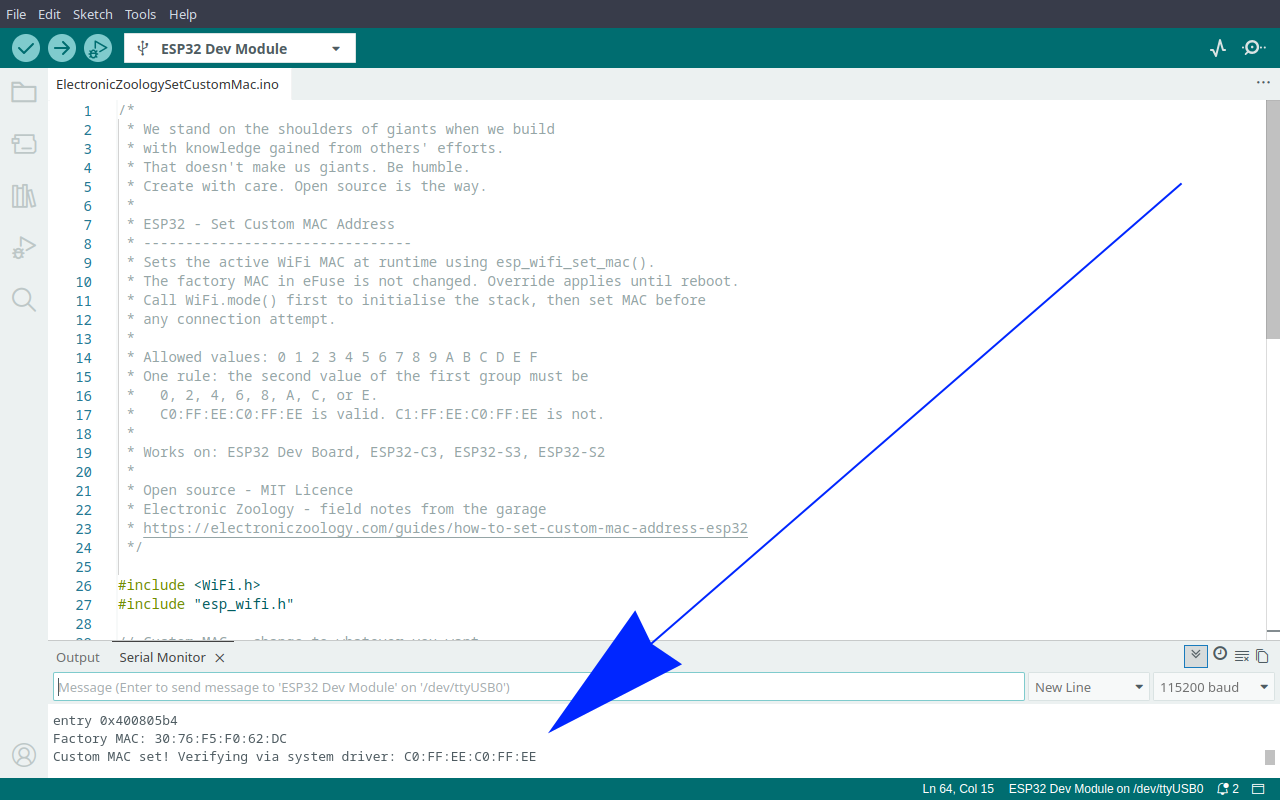
If you see a failure message instead, the most likely cause is an invalid first byte. Check that bit 0 of your first byte is 0. 0xAA is always safe.
Reboot the board without the custom MAC call in setup() and WiFi.macAddress() will return the factory address again. The override is not persistent.
Using it with ESP-NOW
The practical value of MAC spoofing for ESP-NOW is in multi-sender setups. Without it, every board has a unique factory MAC and your receiver sketch either needs a lookup table of every sender's address or you rely on broadcast.
With a fixed custom MAC on every sender, the receiver knows exactly who is sending before you even plug the boards in. Flash the same sender sketch to ten boards and all ten identify themselves identically to the receiver.
The call order in setup() must be:
WiFi.mode(WIFI_STA)esp_wifi_set_mac()esp_now_init()
Calling esp_now_init() before esp_wifi_set_mac() means ESP-NOW initialises with the factory MAC. The custom MAC set afterwards does not retroactively update ESP-NOW's internal state.
A sender sketch with a fixed custom MAC looks like this in setup():
WiFi.mode(WIFI_STA);
esp_wifi_set_mac(WIFI_IF_STA, customMAC);

if (esp_now_init() != ESP_OK) {
  Serial.println("ESP-NOW init failed");
  while (true) delay(1000);
}Everything else in the sender sketch stays the same.
What it does not do
It does not change the factory MAC permanently
eFuse is one-time-programmable and the Arduino ESP32 framework gives no safe way to modify it. The factory value always comes back on reboot.
It does not affect BLE
The BLE radio has its own MAC derived from the same factory base value. esp_wifi_set_mac() only applies to the WiFi interface. BLE MAC spoofing uses a separate API.
It does not work after ESP-NOW is initialised
Set the MAC first, always. If esp_now_init() has already run, the custom MAC will not take effect for ESP-NOW peer registration.